
If there was ever a reason to use an ad blocker, this is the reason. It appears that Google Ads has been used for spam ware. It hasn’t been circumvented. They have not been hijacked. Companies are using it the same way legit companies do, but using it for bad things. This applied to Windows and Mac users.
When someone is browsing the web and an ad pops up, you click on it. Or, maybe accidentally click on it. Then “suddenly their screen goes blank, alarms start blaring from their speakers, their mouse cursor vanishes, and Microsoft says that their computer is infected,” explains Netskope.
As someone would normally do, you hit “escape” but nothing happens. Suddenly, “a phone number flashes on the screen: “Call immediately.” If they call that number, there’s a scammer waiting to extract personal information such as their name, address, phone number, and even credit card numbers.”
The real issue is that it isn’t due to the website, or your computer, being hacked, but it is the Google Ad. Since the warning is full screen, it disables your escape function. Meaning, you are unable to get out of fullscreen mode. The other issue is when the screen takes you to support, either Mac or Windows, the screen waits until you move the mouse.
“This is a check placed by the scammers to evade automated bot detection,” the report said. “Security companies regularly use bots to scan websites and catch scams like this. However, bots don’t move a mouse, so the page quietly waits until it detects mouse movement. Once you do that, you’re taken to another page that looks like a regular online shop called “ShopEase.”

Google Ads Used in new Fraud Scam
Next, if you’re using Windows, you’ll see a fake Microsoft Defender Security Center scanning page. Claiming that your computer is infected with malware. Along with several stacked system dialog boxes and a callback number. On macOS, the scam uses a fake Apple storefront.
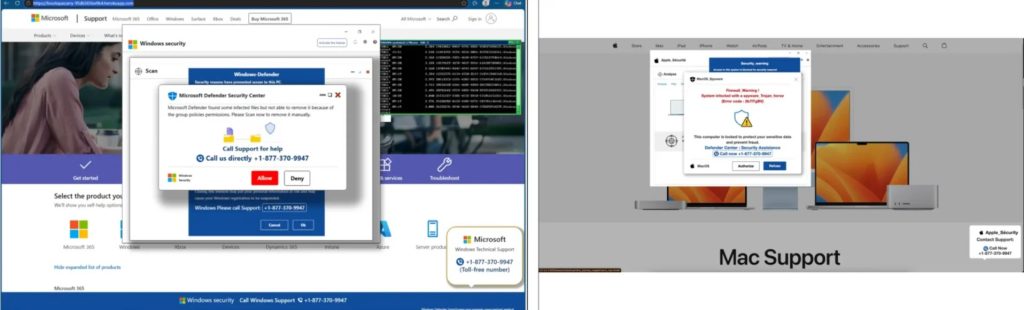
The sneaky thing about this is that they may not use your personal information right away. Since they have access to it, you could be hit with charges later on. My brother was hit with one of these scams years ago. He called me afterwards about what happened. I got mad because I said he should have called me first. It cost him $250.
Some ways to get around this is: Get an ad-blocker. This will prevent 90 percent of this from happening. I say 90 because now some ad-blockers are allowing ads to appear. When “escape” doesn’t work, you can use functions Task Manager on Windows with Ctrl + Shift + Esc, or Force Quit on Mac with Cmd + Option + Esc. Then close your browser. They you will be able to restart your browser and do not restore your last session.
“We have zero tolerance for scams,” Google said in a statement. “We’re actively investigating the campaigns in this report and will take action against accounts that violate our policies.”
Leave a Reply